
Free online genogram maker and creator
Make a genogram free in your browser with no signup. Add each family member, connect partners and children, mark emotional bonds and medical history, then export a PNG or PDF with its key. Every genogram you start is saved in this browser.
Start from a template or an example
Open one in the editor and replace the names and dates with your own family's.
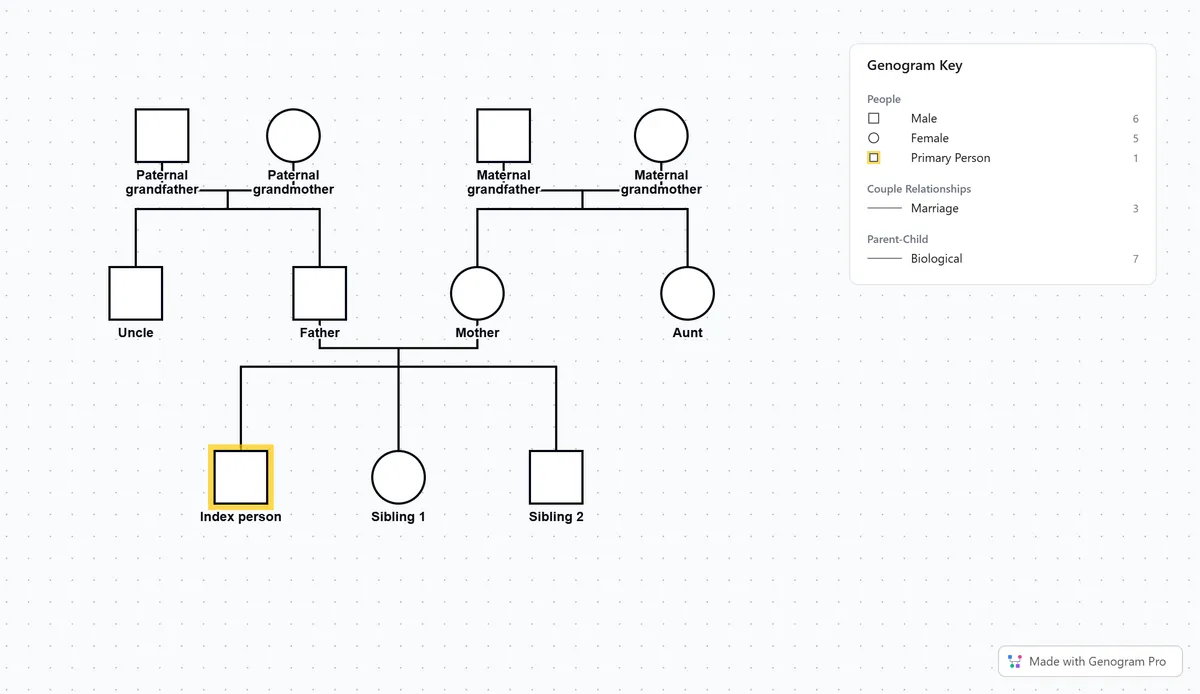
Blank 3 generation template
Grandparents, parents and siblings with role labels
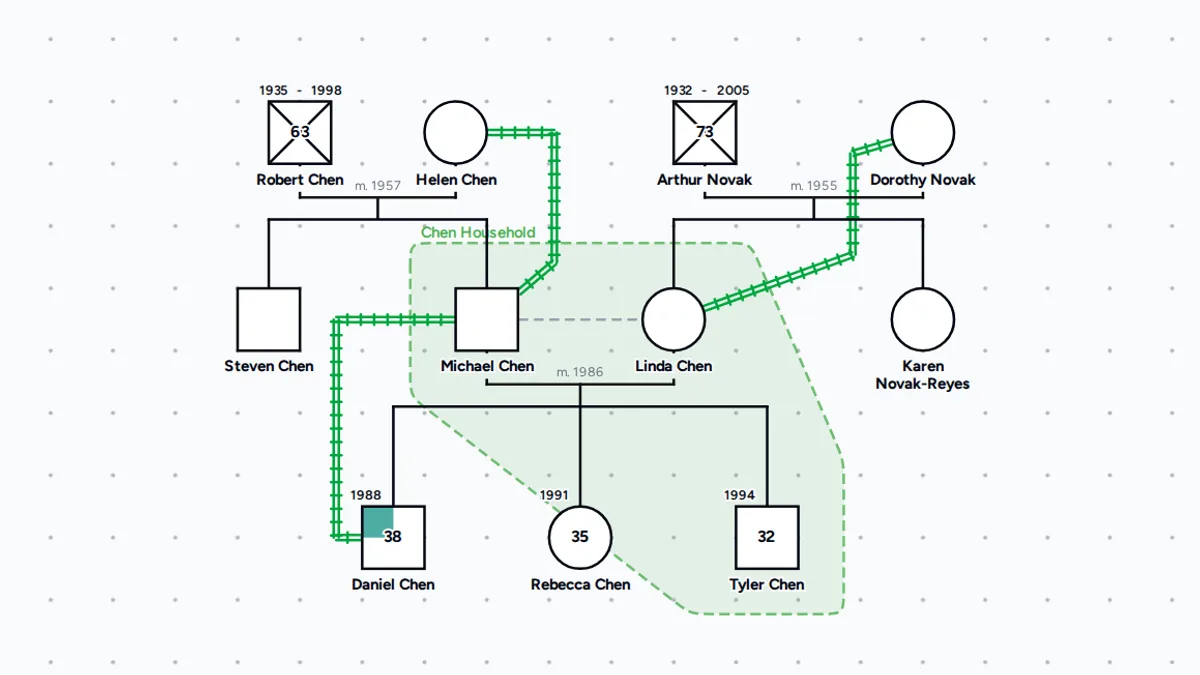
3 generation family genogram
The Chen family across three generations
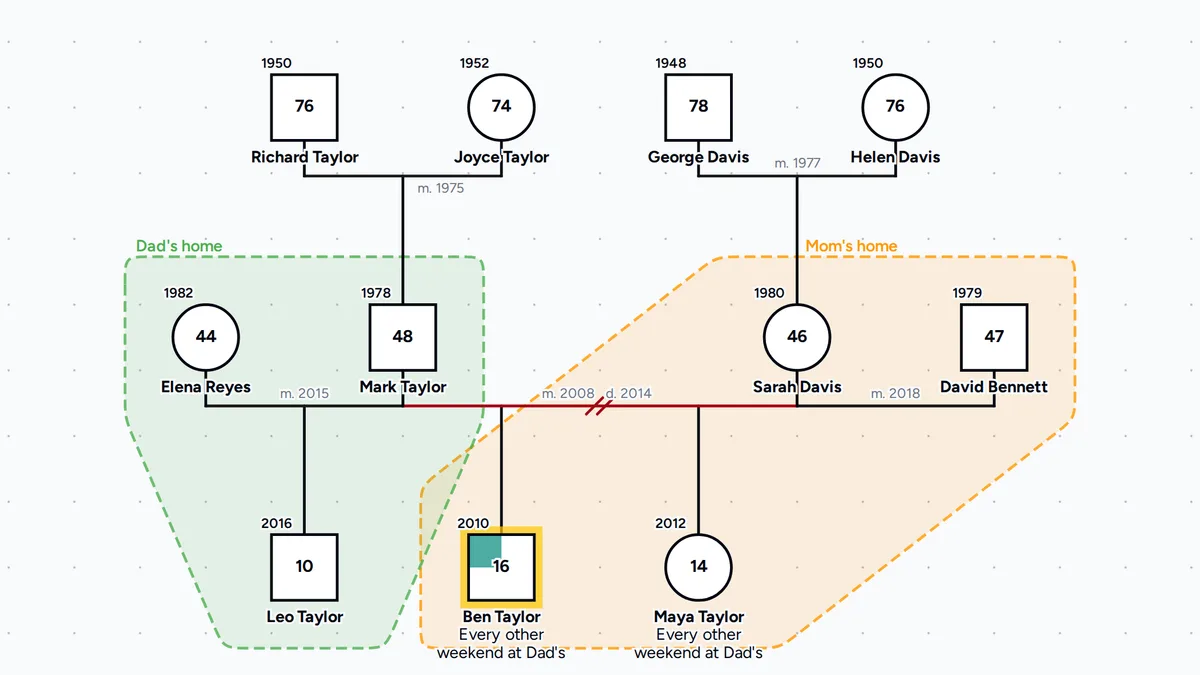
Divorce and remarriage
Two remarriages and two households
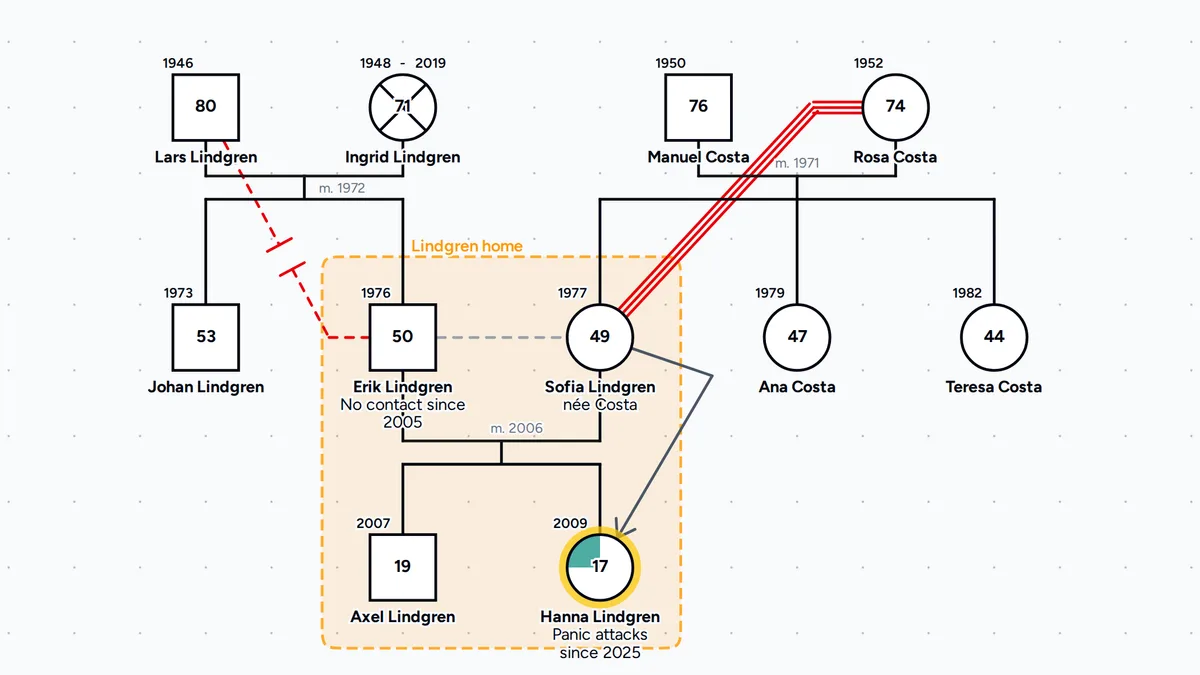
Bowen family therapy
A cutoff, a fused bond and a focused-on child
Make a genogram in four steps
Select a person and add their parents, a partner or a child from the toolbar, and the editor connects them for you. To link two people who are already on the canvas, drag a blue bubble from one person onto the other, using a side bubble for a partner, the top one for a parent or the bottom one for a child.
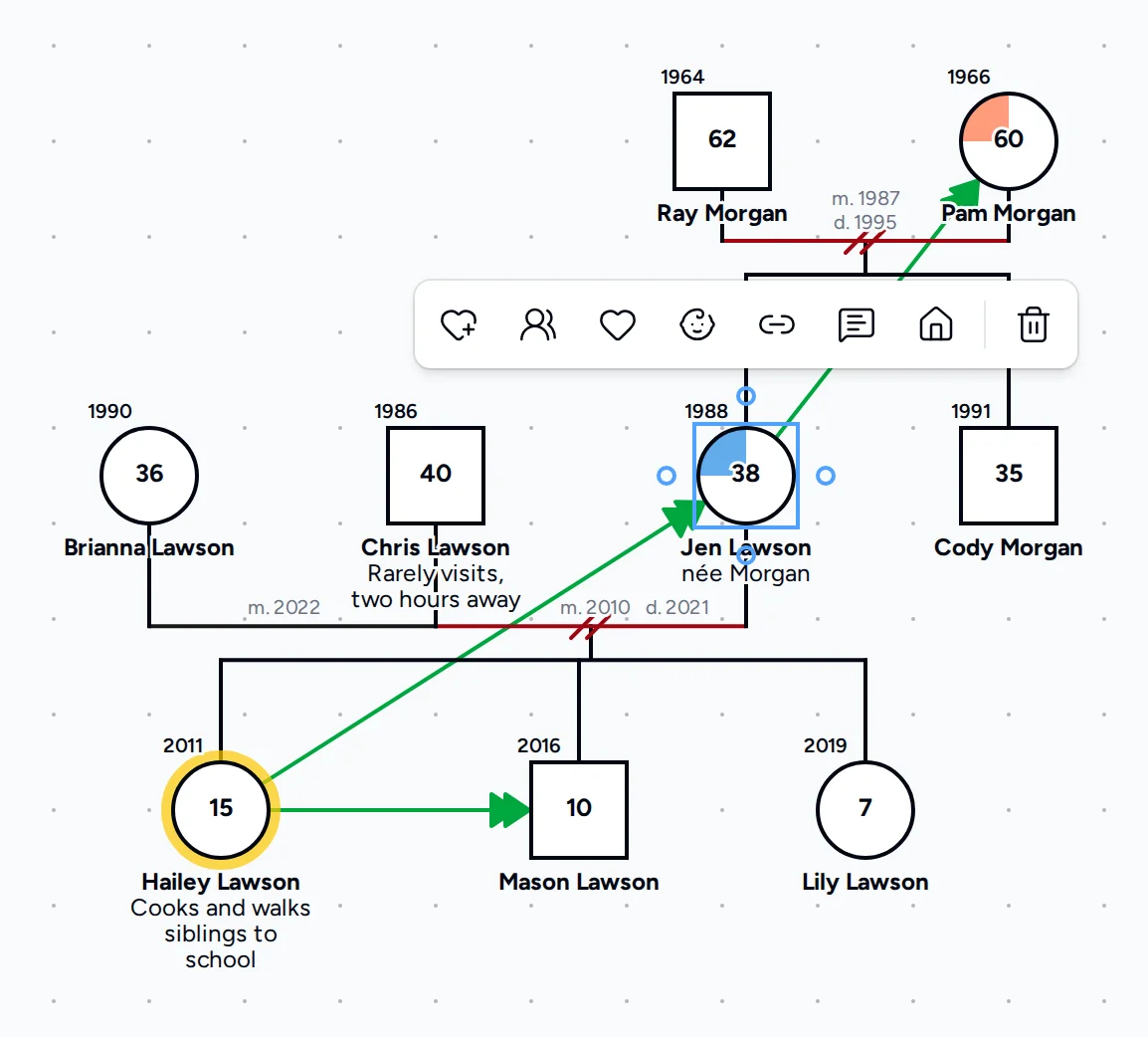
Pick marriage, divorce, cohabitation or another couple line, and mark each child as biological, adopted or foster. Each line is drawn in McGoldrick-Gerson notation, so two slashes always mean a divorce and a dashed child line always means an adoption.
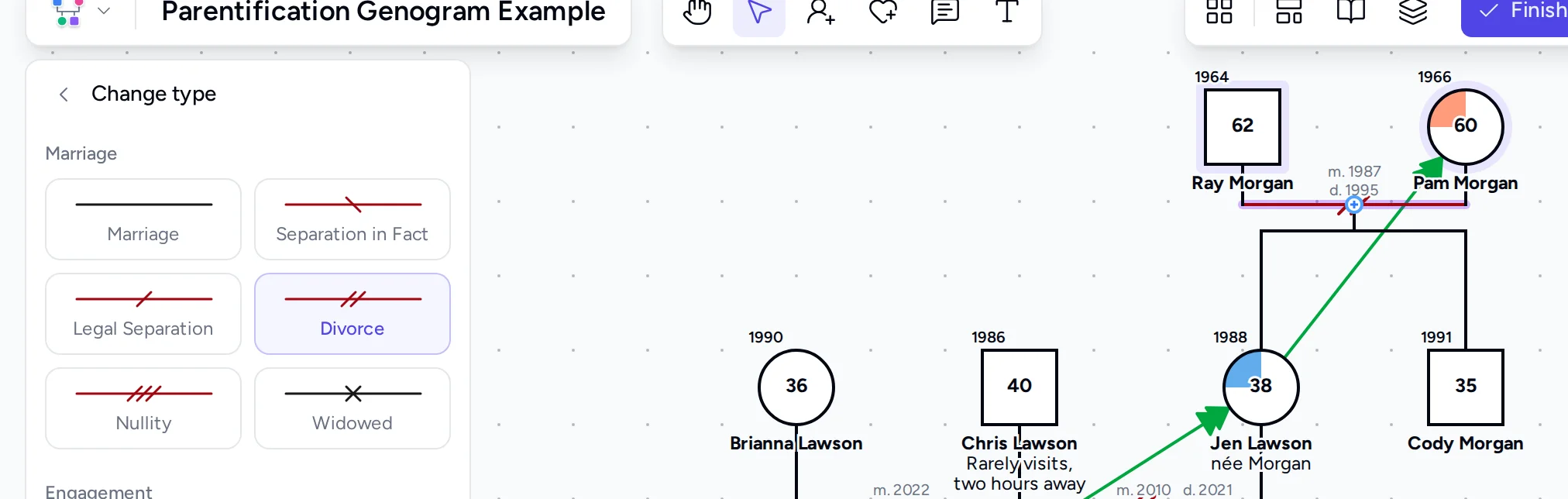
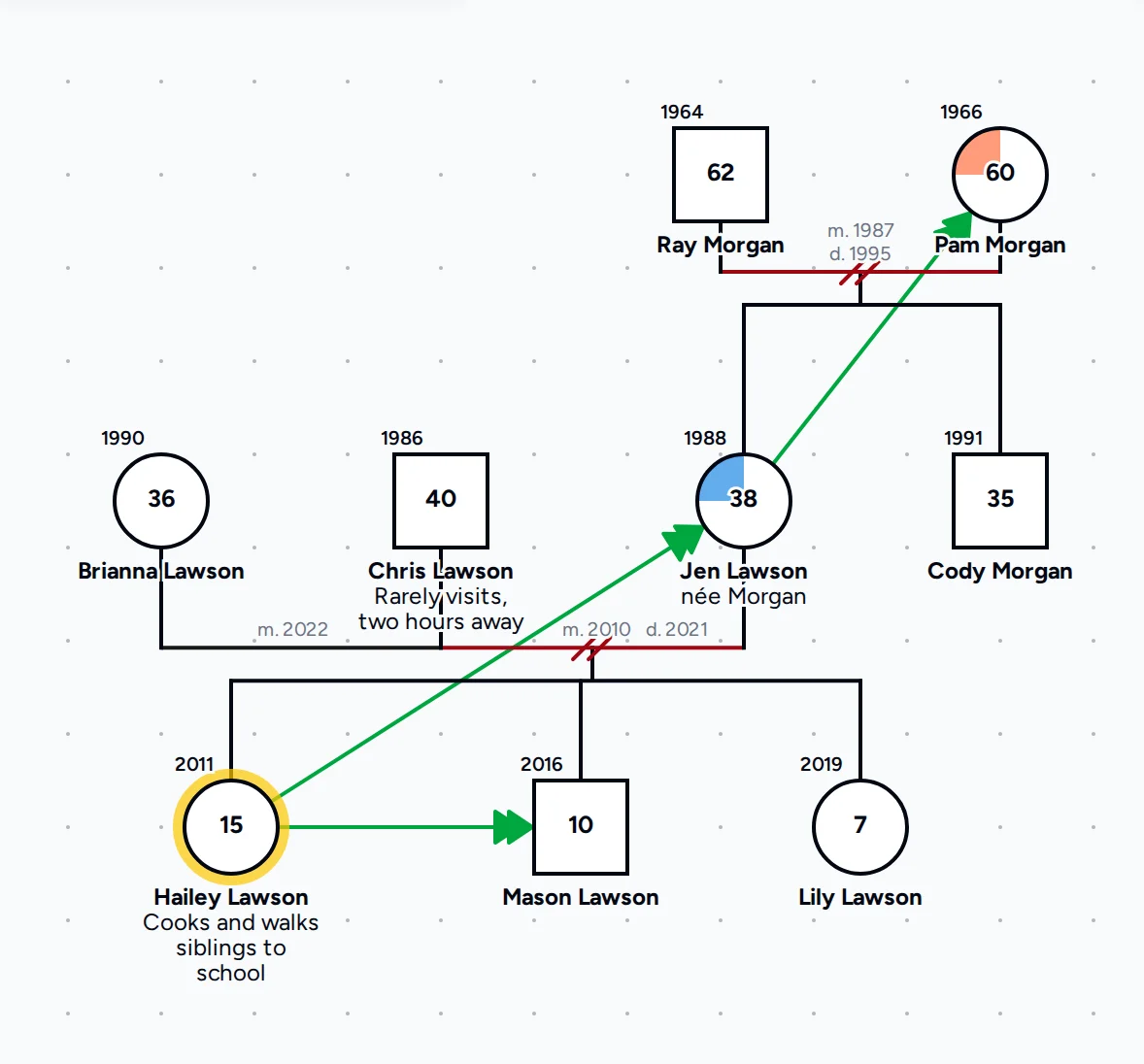
The editor fills one section of the person's symbol for each color-coded condition, and you can pick from 39 bond line types for closeness, conflict, cutoff, abuse, caretaking and other patterns. Add birth and death years, and mark anyone who has died with an X.
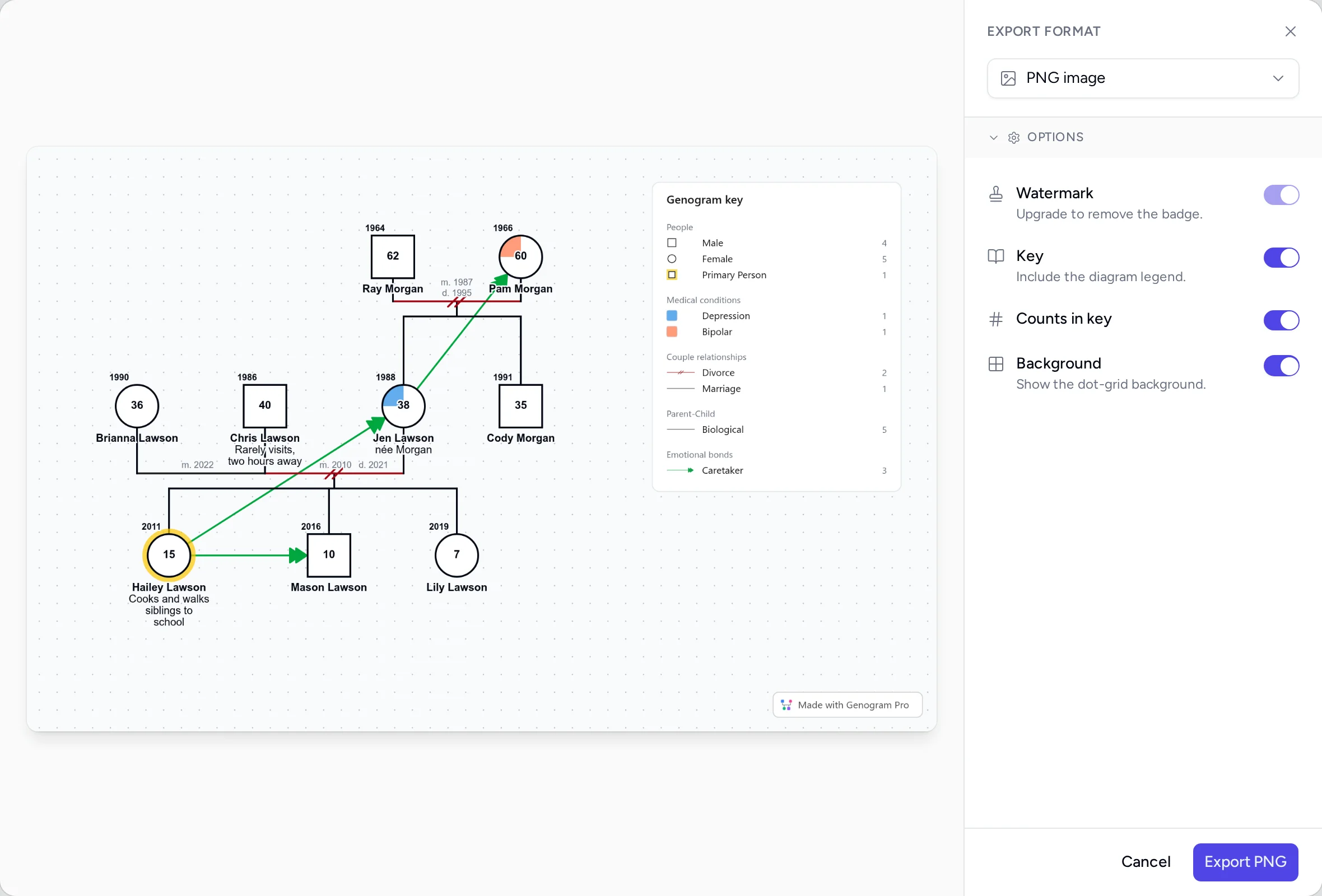
Choose PNG for documents and slides or PDF for print. The editor adds a key with only the symbols and lines you used, so anyone who reads the genogram can follow the notation.
Watch a genogram made in 3 minutes
Read the how to make a genogram guide for what to ask the family and what to put on the diagram, and the genogram key guide for a printable key. For how each part of the free editor works, see the documentation.
Draw genogram notation instead of placing shapes
Canva, Word and diagram apps
You place plain shapes by hand and the notation is up to you, so each new relative means moving shapes again. Medical conditions and emotional bonds have no built-in symbols, so you draw and label each one yourself.
Genogram Pro
Symbols, couple lines, bonds and medical conditions are built in, and auto-arrange lines up each generation in one click. When you add a relative from the toolbar, the editor draws the connecting line, so a new partner or child does not mean redrawing the chart.
Read how Genogram Pro compares with Canva and with Lucidchart.
Genogram symbols the editor draws
The symbols are drawn in the notation of McGoldrick, Gerson and Petry, Genograms: Assessment and Treatment (4th ed., 2020).
Male
A square, drawn on the left of a couple.
Female
A circle, drawn on the right of a couple.
Unknown or non-binary
A diamond, also used for a pet.
Trans male
A square with a circle inside, for a man assigned female at birth.
Trans female
A circle with a square inside, for a woman assigned male at birth.
Gay male
A square with a triangle inside, drawn in a solid line.
Lesbian
A circle with a triangle inside, drawn in a solid line.
Bisexual male
A square with a triangle inside, drawn in a dotted line.
Bisexual female
A circle with a triangle inside, drawn in a dotted line.
Primary person
A yellow outline around the person the genogram is drawn for, also called the index person.
Deceased
An X through the symbol of a person who has died.
Pregnancy
A triangle in the child's place in the birth order.
Miscarriage
A triangle with an X, for a pregnancy that ended in a miscarriage.
Abortion
A triangle with an X and a short bar, for an induced abortion.
Stillbirth
A small square or circle with an X, for a baby who was stillborn.
Marriage
A solid black line for a legal marriage.
Legal separation
One forward slash, for a separation a court has recognized.
Divorce
Two forward slashes, for a marriage a court has dissolved.
Widowed
An X on the line, for a marriage ended by a partner's death.
Engagement
A blue dashed line for a couple who plan to marry.
Cohabitation
A blue dash-dot-dot line with a house, for an unmarried couple who live together.
Biological
A solid line from a birth parent.
Adopted
A dashed line from each adoptive parent.
Foster
A dotted line from each foster parent.
Other or unknown
A faint dotted line for a parent and child whose tie is unknown.
Fraternal twins
Two child lines that start from one point.
Identical twins
Two child lines from one point, with a short bar between them.
Very close
A deep friendship with unusual trust and understanding.
Fused
An enmeshed, dependent tie in which neither person has much separate identity.
Distant
The two see little of each other and rarely talk.
Discord
At least one sees the relationship as negative, and both think they are right.
Hostile
Frequent arguments over major issues, and tension whenever they are together.
Cutoff
All contact has stopped after a closer relationship.
Focused on
An unhealthy focus such as favoritism or obsession, with the arrow pointing to its target.
Questions people ask
Read how to make a genogramWhat is the best free genogram maker?
The best free genogram maker draws correct genogram notation, not generic shapes. This editor includes standard symbols, 68+ relationship and emotional bond lines, color-coded medical conditions, PNG or PDF export, and unlimited genograms saved in your browser, with no signup required.
How can I create my own genogram?
Add yourself in the editor at the top of this page, then select your symbol and add your parents, a partner and children from the toolbar. Pick the couple and child line that fits each relationship, mark medical conditions and emotional bonds, and export the genogram as a PNG or PDF.
Is this genogram maker free?
Yes. You can build genograms and export them as PNG images or PDFs without an account, at no cost, and each free export has a small "Made with Genogram Pro" badge. Your genograms are saved automatically in this browser, so you can close the tab and pick up where you left off. To keep them in an encrypted account you can open on any device, start a 7-day free trial.
Can AI make a genogram?
Yes. The AI assistant in Genogram Pro draws a genogram from a typed description or intake note, or from a photo of one drawn by hand, and you edit the result like any other genogram. It is part of the Professional plan and included in the 7-day free trial. The editor on this page has no AI, so you add each person yourself.
Read how the AI assistant worksDo I need an account to download my genogram?
No. You can build a genogram and download it as a PNG image or PDF without an account or a card. You only enter payment details if you start the 7-day free trial, and you are not charged if you cancel before the trial ends. With an account, you can import the genograms from this browser and open them on any device.
Can I save my genogram and come back later?
Yes. The free editor saves every genogram in this browser as you work, and you can switch between them in My genograms. They are stored only in this browser on this device, so they are deleted if you clear the browser data. Safari, and every browser on an iPhone or iPad, also clears that storage after 7 days without a visit.
Is there a free app that can create genograms?
Yes. This genogram maker is free, needs no account to build, save or export, and runs in any modern browser on a computer, phone or tablet. Because there is nothing to install, it also works on managed machines where you cannot install software.
Is there a genogram template in Word?
Yes. The blank 3 generation template, the version with your own partner and children, and the genogram worksheet can each be downloaded as a Word file from the genogram template page. In Word you can annotate the two templates or print the worksheet to draw on by hand. To add people or change the structure, open the blank template in this editor.
Download the Word templatesDoes Canva have a genogram template?
Yes, but a Canva genogram template is made of generic shapes, so you draw every couple and child line yourself and check the notation against a symbols chart. Genogram Pro draws the standard symbols, couple lines and bonds for you, and auto-arrange lays out the whole family at once.
What is a genogram?
A genogram is a family map of relationships, emotional bonds and medical history across generations, drawn in standard McGoldrick-Gerson notation. Therapists, social workers and medical teams use genograms to spot patterns that repeat from one generation to the next.
Read what a genogram isHow is a genogram different from a family tree?
A family tree shows lineage, meaning who descends from whom, with names and dates. A genogram also shows how the family functions, with couple statuses such as divorce or cohabitation, emotional bonds such as closeness, conflict and cutoff, and color-coded medical history.
See a genogram and a family tree of the same familyHow many generations should a genogram include?
Most genograms show at least three generations: the grandparents, the parents, and the person the genogram is drawn for with their siblings. Add a fourth generation when an illness, a cutoff or another pattern began with the great-grandparents.
What should I include in a genogram?
Start with each person's name and birth year, and the year of death for anyone who has died. Then add how each couple is connected, which children are biological, adopted or foster, the medical conditions that run in the family, and the emotional bonds that matter to the question you are exploring.
Can I show who lives together?
Yes. Select a person, choose Add to household from the toolbar and click the person who shares the home, or drag a selection box around everyone who lives there and choose Create household in the panel. The editor shades each household, and when you label the households, for example Mom's home and Dad's home, the genogram shows the custody arrangement.
Can I use the free genogram maker for a class assignment?
Yes. In the free editor you can draw the three-generation genogram that many nursing, social work and counseling programs assign, and export the finished genogram as a PNG or PDF to submit or print.
Can I share my genogram with someone else?
Yes. Export it as a PNG or PDF and send or print the file. With a Professional account you can also create a read-only share link and protect it with a password, so a supervisor or colleague can open the genogram in their own browser.
Is my data private?
Yes. The free editor runs entirely in your browser, and your genograms are not sent to a server unless you import them into an account. Genograms in an account are encrypted end-to-end on your device before we store them, so not even we can read them.
Can I print my genogram?
Yes. Export a PDF to print, or a high-resolution PNG to place in another document. Leave Key on in the export options to print a legend beside the genogram, so a reader can check each symbol against it.
Keep every genogram in one place
Save your genograms to an encrypted account so each case is ready the next time you open it.