
Table of Contents
Divorce and remarriage genogram: symbols and example
An example genogram of a divorced and remarried family. It shows how to mark the divorce, add each new partner, and place the children from both marriages. Open it as a template and replace the names with your own.
Last updated June 2026 · Based on McGoldrick et al., Genograms: Assessment and Treatment (4th ed., 2020) and Minuchin's structural family therapy
This example is designed to illustrate how to create and read genograms. It is not intended as clinical guidance.
Trace the divorce line between Mark and Sarah, then follow the remarriage lines to Elena and David Bennett. Notice Ben's position spanning two remarried households.
Use as Template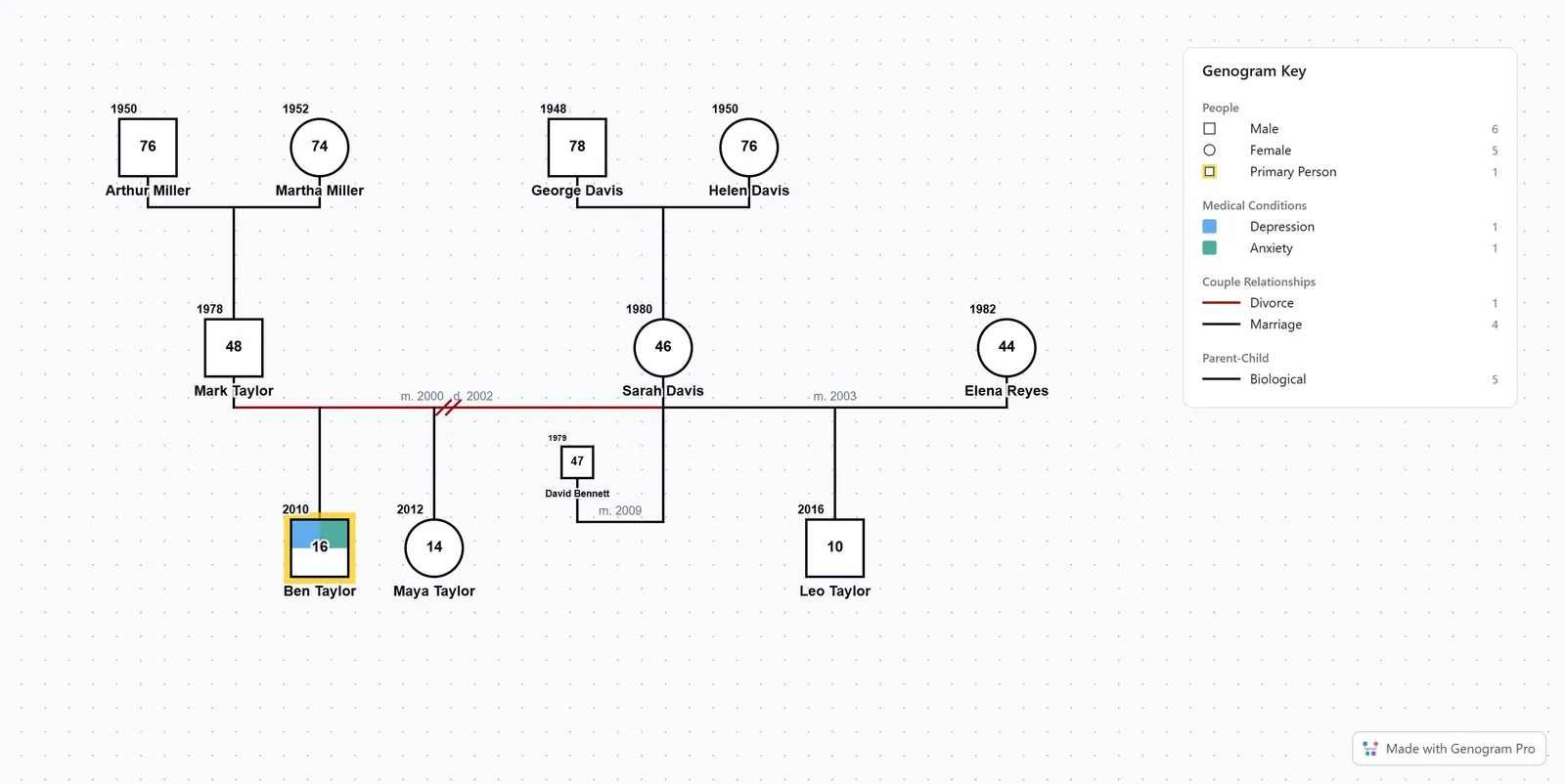
Divorce symbols
Every divorce-related marker sits on a solid red couple line, and the slash count tells them apart: one slash for separation, two for divorce, three for annulment.
Map a blended family yourself
Open the free editor to draw divorce lines, add new partners, and place children across two households.
free online genogram makerOne backslash (\). They have moved apart but filed nothing. Still legally married.
One forward slash (/). A court recognized the separation, but the marriage is not dissolved yet.
Two forward slashes (//). The marriage is legally over.
Three forward slashes (///). Annulment, where the marriage is declared as if it never happened.
When someone remarries, draw a new couple line to the new partner and leave the old line in place, divorce slashes and all. The first marriage stays on the diagram so its history is not lost. You can make a genogram for free to practice this on your own family.
Where to place partners after remarriage
The tricky part is where each partner goes, especially once both people remarry. A few rules keep it readable:
- Order the partners by time. Put the first spouse closest to the person and each later partner one step further out, so the row reads in the order the marriages happened.
- Keep shared children in the middle. When both ex-partners remarry, the children they had together stay between the two original parents, connected to both. Each new partner goes out to the side of their own spouse.
- Set the dates on each couple line. Click a line to add its marriage and divorce dates. Clicking it also highlights the two people it connects, so you can tell who was married to whom.
In this example Mark and Sarah divorced, so Elena sits out past Mark and David out past Sarah, while Ben and Maya stay in the middle between their two parents.
How to build this in Genogram Pro
Build the original couple and their children
Add Mark and Sarah as a couple. Add their children Ben (mark as identified patient with the yellow outline) and Maya below. Then change the Mark-Sarah connection type to "divorce."
Add the remarriages
Select Mark and click "Add Partner" in the selection toolbar. Add Elena as Mark's second spouse with a marriage line. Click "Add Child" to add Leo below Mark and Elena. Select Sarah and click "Add Partner." Add David Bennett with a marriage line. Position the two new households so Ben and Maya sit visually between them.
Add the grandparent generation
Select Mark and click "Add Parents" in the selection toolbar. Add Arthur and Martha Miller. Select Sarah and click "Add Parents." Add George and Helen Davis. This creates the three-generation structure.
Create household groups
Select the members of each household and group them. Mark's household includes Elena and Leo. Sarah's household includes David Bennett. Place Ben and Maya in their primary household. Attach a note to Ben documenting the custody arrangement.
Add conditions and bond types
Add anxiety and depression as medical conditions to Ben. Select Ben, click Emotional Bond, then click family members to set bond types reflecting loyalty conflicts. Attach notes about custody arrangements and household rules.
Frequently Asked Questions
How do you show divorce on a genogram?
How many slashes mean divorce?
How do you show divorce and remarriage on a genogram?
How do you show a second marriage on a genogram?
Where do the new partners go when both parents remarry?
How do I show step-children on a genogram?
Can a genogram show which parent has custody?
How do half-siblings appear differently from full siblings on a genogram?
Ready to Create Your Own Genogram?
Build professional genograms online with standard notation, AI-powered generation, and end-to-end encryption.